JavaScript Debugging Tasks
Interview rounds often hand you code someone else wrote and a description of what is going wrong. JavaScript Debugging Tasks let you practise that.
Each task is a small JavaScript codebase with instructions that describe what is going wrong. You find the cause in each file, fix it and verify the file. The final file stays read-only until every other file is verified.
- 01fail
getShuffleDefault() returns false
- 02fail
getShuffleDefault() returns a boolean type
- 03fail
getAvailableGenres() returns 8 configured genres
- 04pass
PLAYER_CONFIG.playback object preserved
- 05pass
PLAYER_CONFIG.library object preserved
The PopPop sample task
PopPop is a music player made of six JavaScript files with fourteen bugs between them. The shuffle setting is wrong, the progress bar stops at 1% and the now-playing display shows the wrong track. You fix every bug without breaking the code that already works.
Fix the music player
Six JavaScript files. Some have one bug, some have several and some have none. The instructions describe symptoms, not causes. Fix what is broken and leave working code as it is. The final file checks everything.
- getShuffleDefault() === false
- typeof getShuffleDefault() === 'boolean'
- getAvailableGenres().length === 8
- PLAYER_CONFIG.playback unchanged
- PLAYER_CONFIG.library unchanged
- Reading a codebase of six files written by someone else
- Tracing each bug from its symptom to the line that causes it
- Fixing code without breaking functions that already work
- Type coercion in JavaScript
- A final file that depends on every other file
01var PLAYER_CONFIG = {02 playback: {03 shuffle: false,04 repeat: "off",05 repeatOptions: ["off", "track", "playlist"]06 },07 library: {08 genres: ["pop", "rock", "hip-hop", "electronic", "jazz", "classical", "r&b", "country"]09 }10};1112function getShuffleDefault() {13 // FIX: returning repeat ("off") instead of shuffle, string is truthy, player starts shuffled14 return PLAYER_CONFIG.playback.repeat;15}1617function getAvailableGenres() {18 // FIX: typo "generes", property does not exist, returns empty array19 return PLAYER_CONFIG.library.generes || [];20}
How a JavaScript Debugging Task works
Each task starts with instructions that describe what is broken. The files are listed in an explorer beside the editor, and the final file stays read-only until every other file is verified.
- 01Read the instructions and the symptoms they describe.
- 02Open a file and trace each symptom to its cause.
- 03Fix the code and verify the file.
- 04When every other file is verified, the final file opens and checks the whole codebase.
What you see and do in a JavaScript Debugging Task
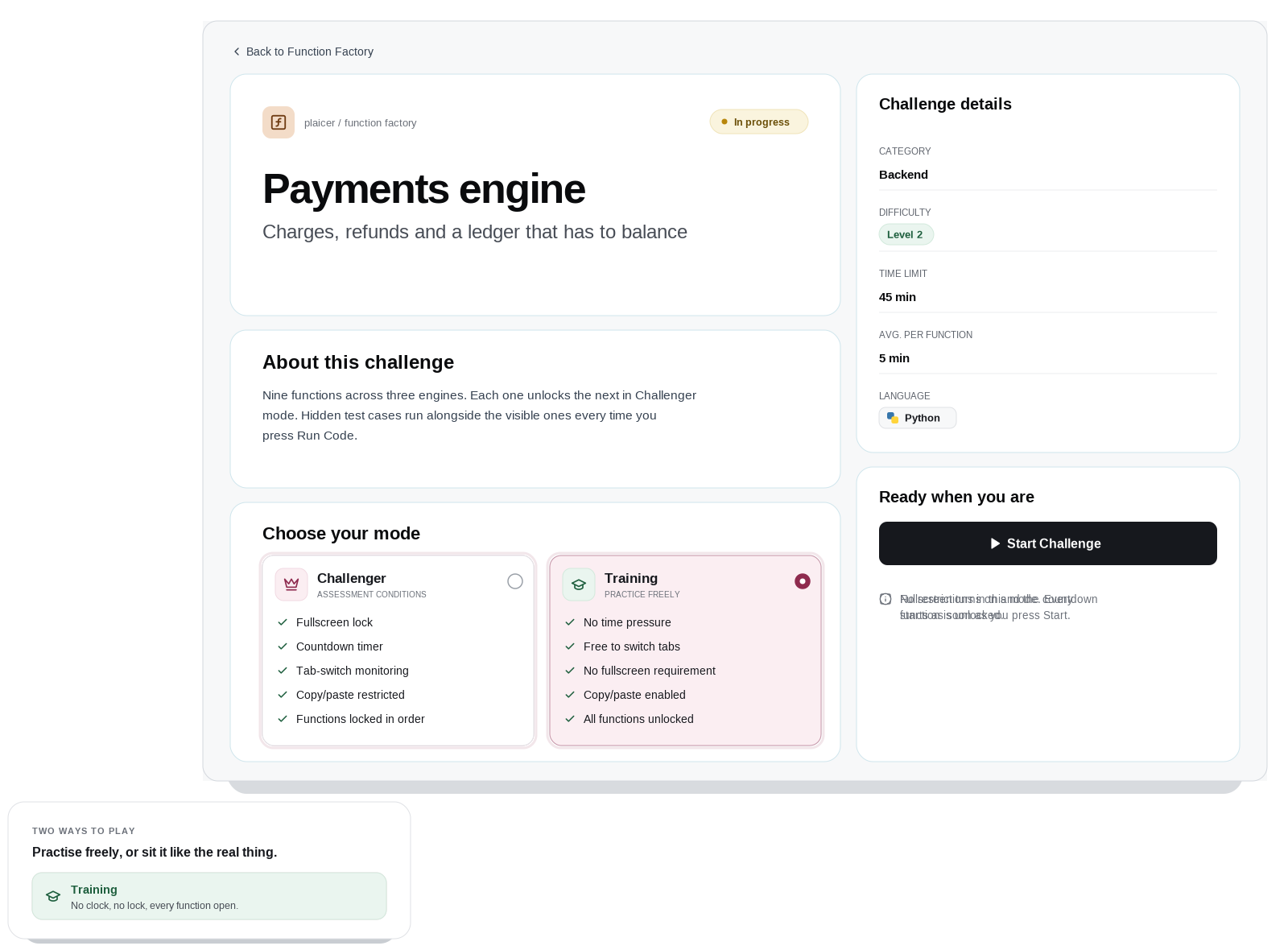
Each task opens on a page that describes it and lists its category, difficulty, time limit, average time per file and language. You choose a mode there and start.
Instructions and files
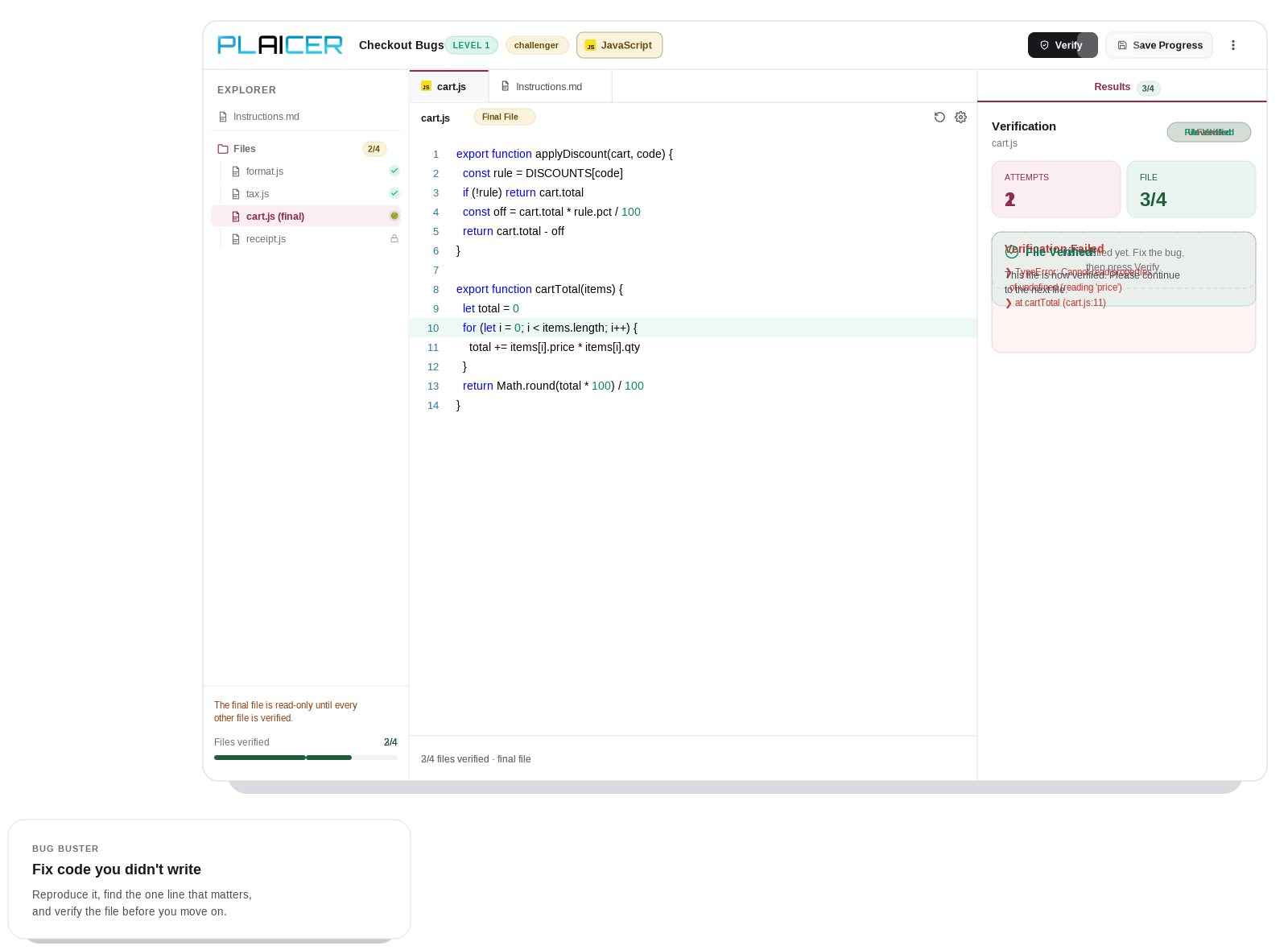
The Explorer shows the instruction tabs and a Files folder with a count of verified files. The files are in a fixed order.
The last file is marked final. It shows a Final File badge and stays read-only until every earlier file is verified.
Verifying a file
Verify runs the tests for the open file with your fixed versions of every earlier file loaded. If the file passes, File Verified appears and you continue to the next file.
If it fails, Verification Failed lists the failure messages from the tests that broke, or tells you the code has a syntax or compilation error.
Attempts
Every verify adds one to the Attempts count in the Results panel. There is no limit on verifies, and a file that passes saves your progress.
The final file
The final file runs with your fixes from every earlier file in place. A change that breaks a function that already worked can make it fail, so you check the effect of each fix on the rest of the codebase.
When the final file passes, the task is complete.
How the task is scored
Your score is the share of tests passed across the files you saved. Time does not change the score.
If you leave a task before finishing it, it is marked as a fail, and the progress you saved is still scored.
Your results
The results page shows whether all bugs are fixed, your score, the files verified, the time taken and the number of code resets. In Challenger mode it also shows tab changes and full-screen exits.
Each file is listed as Verified, In progress, Not verified or Not completed.
Training mode and Challenger mode
Before each task starts you choose a mode. Challenger mode simulates the conditions of a real online assessment. Training mode lets you practise the same task without restrictions.
In Challenger mode, full screen turns on when you start. Leaving full screen or switching tabs is recorded on your results, and copying code out of the editor is blocked.
In Training mode there is no time pressure. You can switch tabs, full screen is not required, and copy and paste work.
Three levels in every set
Each set of JavaScript Debugging Tasks has three levels, and each level moves the bugs further from the output you can see.
Level 1, visible logic bugs
The bugs are in the logic and show up in the output. You read the instructions, find the line that causes each symptom and fix it. Technical screens often include this kind of debugging task.
Level 2, bugs that produce no error
The code runs and nothing crashes or logs an error, but the result is wrong. You trace the symptom back through the code to find which line produces it.
Level 3, bugs in the assumptions
The bugs are in the assumptions the code makes, such as state that changes across calls or data that arrives in an order the code does not expect. You find them from the symptoms described in the instructions.
What each JavaScript Debugging Task includes
Instructions to read first
Each task starts with instruction tabs that describe what is going wrong. You find the causes in the code.
Bugs across several files
A bug in one file can break the code in another, so you trace faults across the codebase as well as inside one function.
Every verify is counted
You make your fix and then verify the file. Every verify adds one to the Attempts count in the Results panel.
Working code has to stay working
The final file runs with your fixed versions of every earlier file, so a change that breaks a function that already worked can make it fail.