Plaicer for universities
Students applying for developer roles meet a timed data structures and algorithms assessment, then interview stages where an interviewer asks technical questions and follows up on each answer. Plaicer lets every student in a cohort practise both with an AI interviewer, and each stage gets its own report.
Educators set up cohorts, fund them from a shared credit pool and follow each student's reports on the educator dashboard. Student data is stored in the European Union and is never used to train AI models.
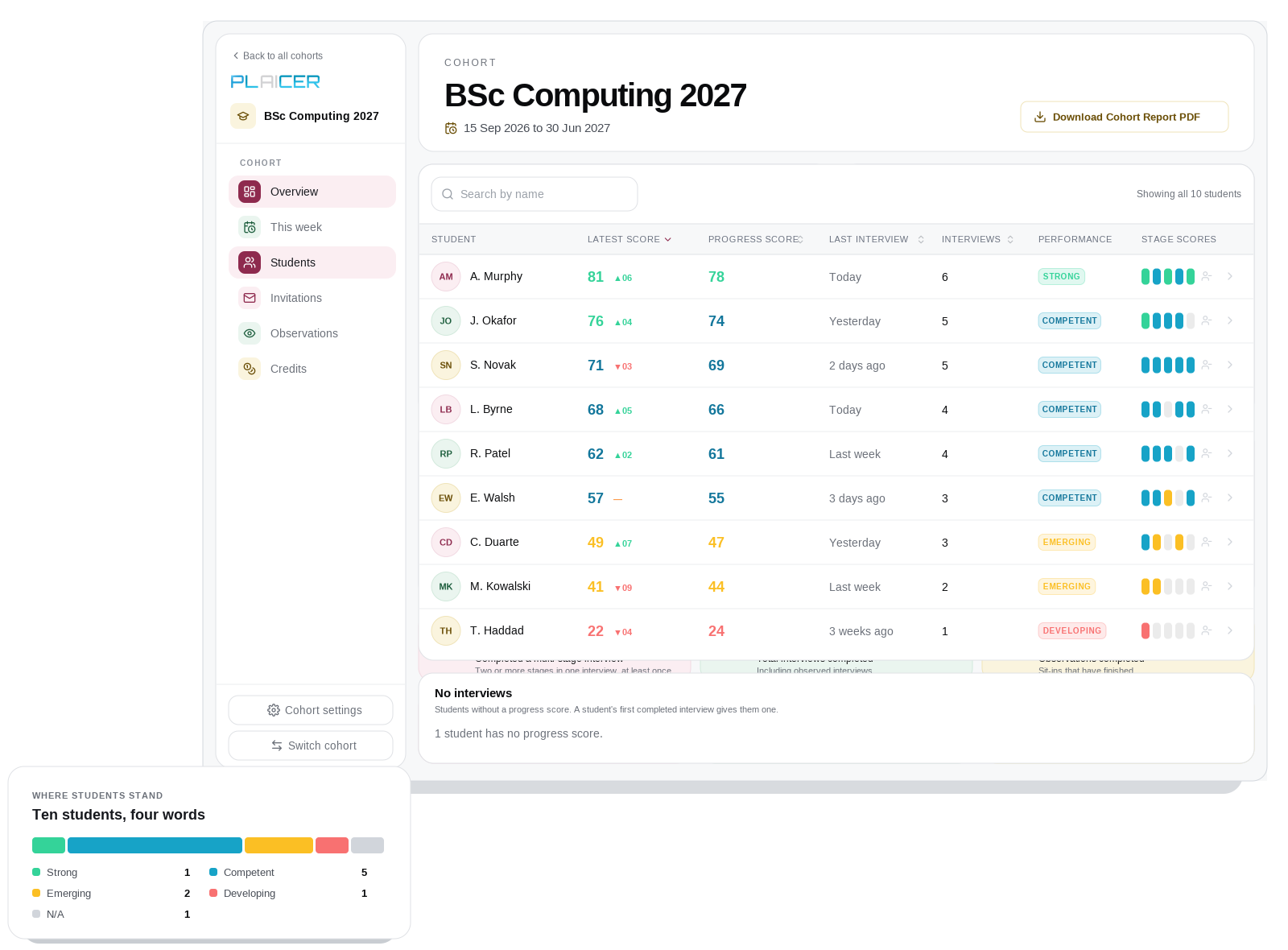
- Cohorts
- Shared credit pool
- Live observation
- Report PDFs
- Hosted in the EU
- GDPR Article 28 agreement
What your students practise
Cohort students practise the same stages and rounds as any developer on Plaicer. Each card starts with what a student faces in a real hiring process, then what they practise for it.
What each stage costs from the cohort's credits
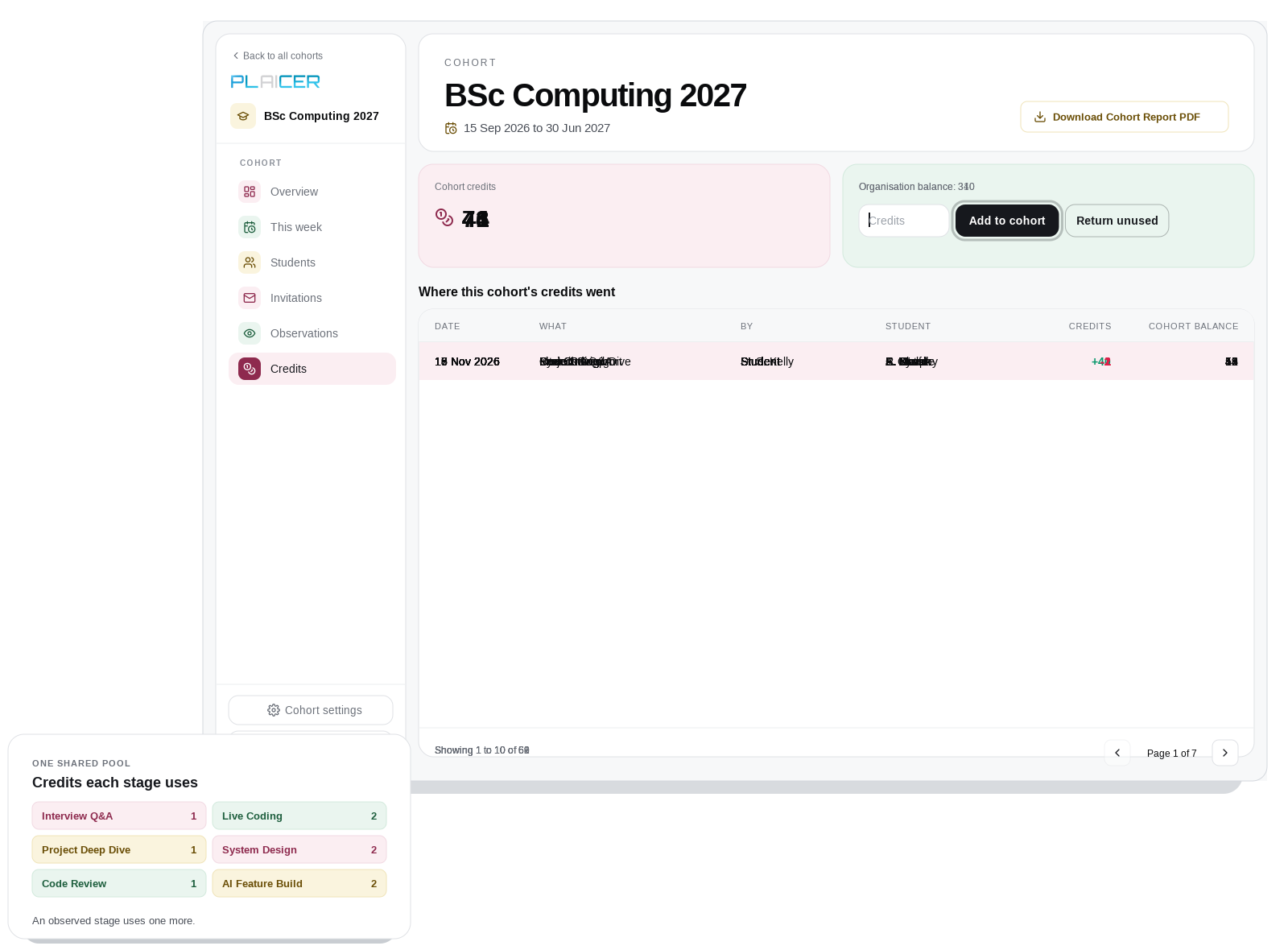
Cohort stages cost the same number of credits as a student's own stages. Once a student enters a stage, its credits are spent.
- Interview Q&ATechnical Interview Practice1
- Project Deep DiveTechnical Interview Practice1
- Code ReviewTechnical Interview Practice1
- Live CodingTechnical Interview Practice2
- System DesignTechnical Interview Practice2
- Screening round, any formatData Structures and Algorithms Screening Practice2
- AI Knowledge Q&ABuilding with AI1
- AI Feature BuildBuilding with AI2
- AI Workflow DesignBuilding with AI2
Setting up a cohort
An educator account sets up each cohort from the educator dashboard. These are the steps.
Create a cohort
Create a cohort for a class or a group of students. A cohort is active until its end date passes or it is archived.
Invite students
Send invites by email. Students join from the invite, and each student can see their cohort, its live observation requests and the notes shared with them.
Assign credits
Assign credits from your organisation's shared pool to each cohort. Students in an active cohort start stages on the cohort's credits, at the same cost per stage as the table above.
Set a target
Set a target score for the cohort. The cohort page shows the average against the target and how many students have reached it.
Roles on your team
Each person on your team signs in with their own email one-time code. What they can see depends on their role.
Management
One management account owns the organisation. Management and superadmins see every cohort in the organisation.
Superadmin
A superadmin has the same access to cohorts as management, with their own email sign-in.
Admin
An admin sees only the cohorts assigned to them. An admin can request more credits for a cohort, and the request goes to management and the superadmins.
The educator dashboard, live observation and reports
The educator dashboard has a card for each area, and each card opens its own page.
The educator dashboard and cohort pages
The educator home has an overview with headline figures for all your cohorts, and cards for cohorts, students and live observations. Each cohort page shows the same progress charts a student sees on their own dashboard, averaged across the cohort's students.
Lists on the overview pick out students who need attention. Each student's page opens their history across Technical Interview Practice and data structures and algorithms screening practice.
- See headline figures for every cohort you can access.
- Compare the cohort average with your target.
- Open a student to read every report they have.
- Download a cohort report or a student report as a PDF.
Watching a student's stage live
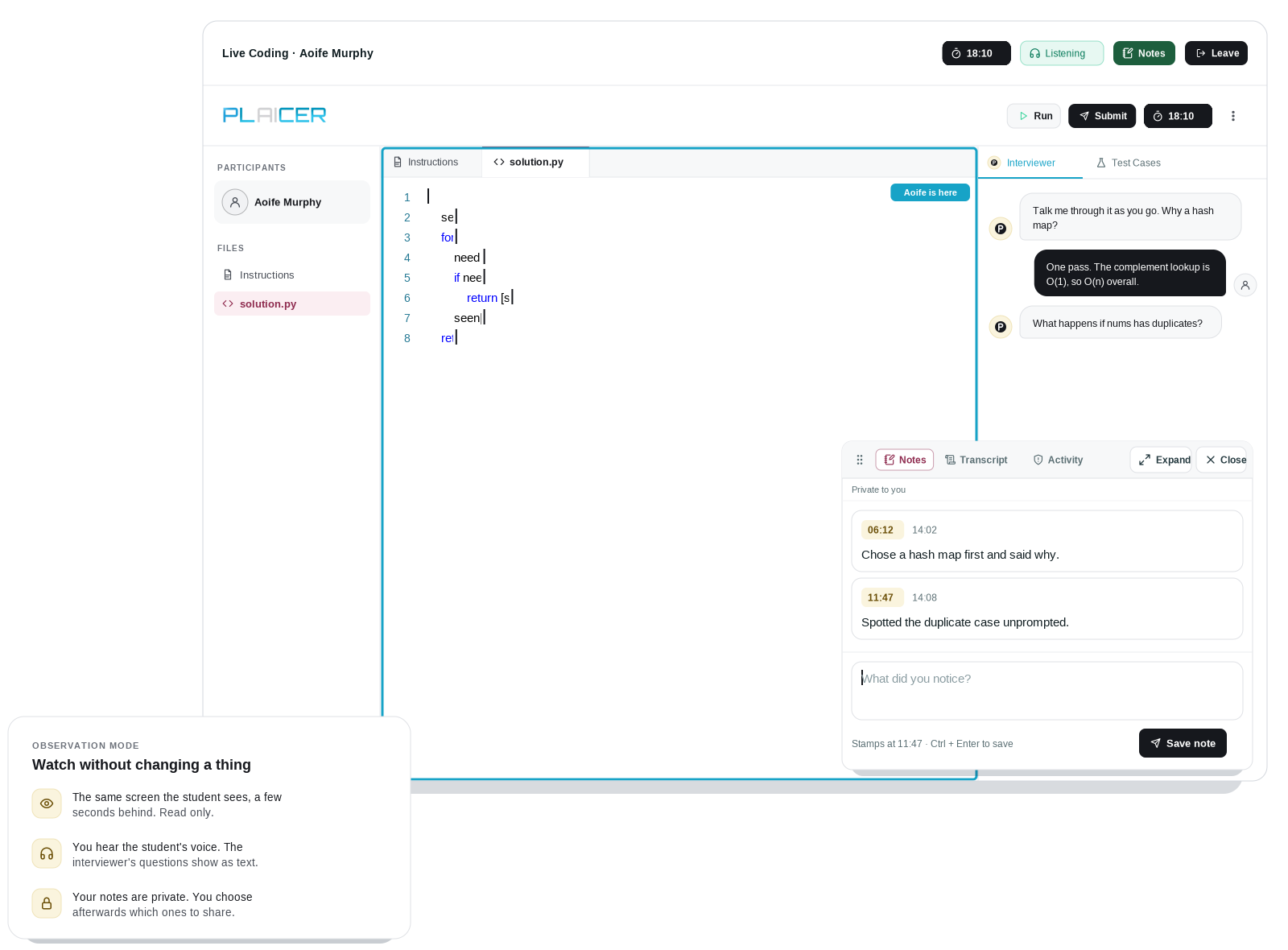
An educator can schedule a live observation of one stage. The student receives the request and accepts or declines it. During the stage the educator follows the student's work in a read-only view and hears the student in Interview Q&A, Live Coding, Project Deep Dive and System Design.
The educator writes private notes, each stamped with the time in the stage, and can open the transcript of the stage and an Activity panel that shows when the student leaves full screen or switches tabs. After the stage the educator chooses which notes to share, and the student sees the shared notes alongside their report. The student is shown that the stage is being observed.
- Choose the focus area, the stage and a time.
- The student accepts, or declines and gives a reason.
- Follow the stage and write timestamped notes.
- Share selected notes with the student afterwards.
What an educator sees in a student's report
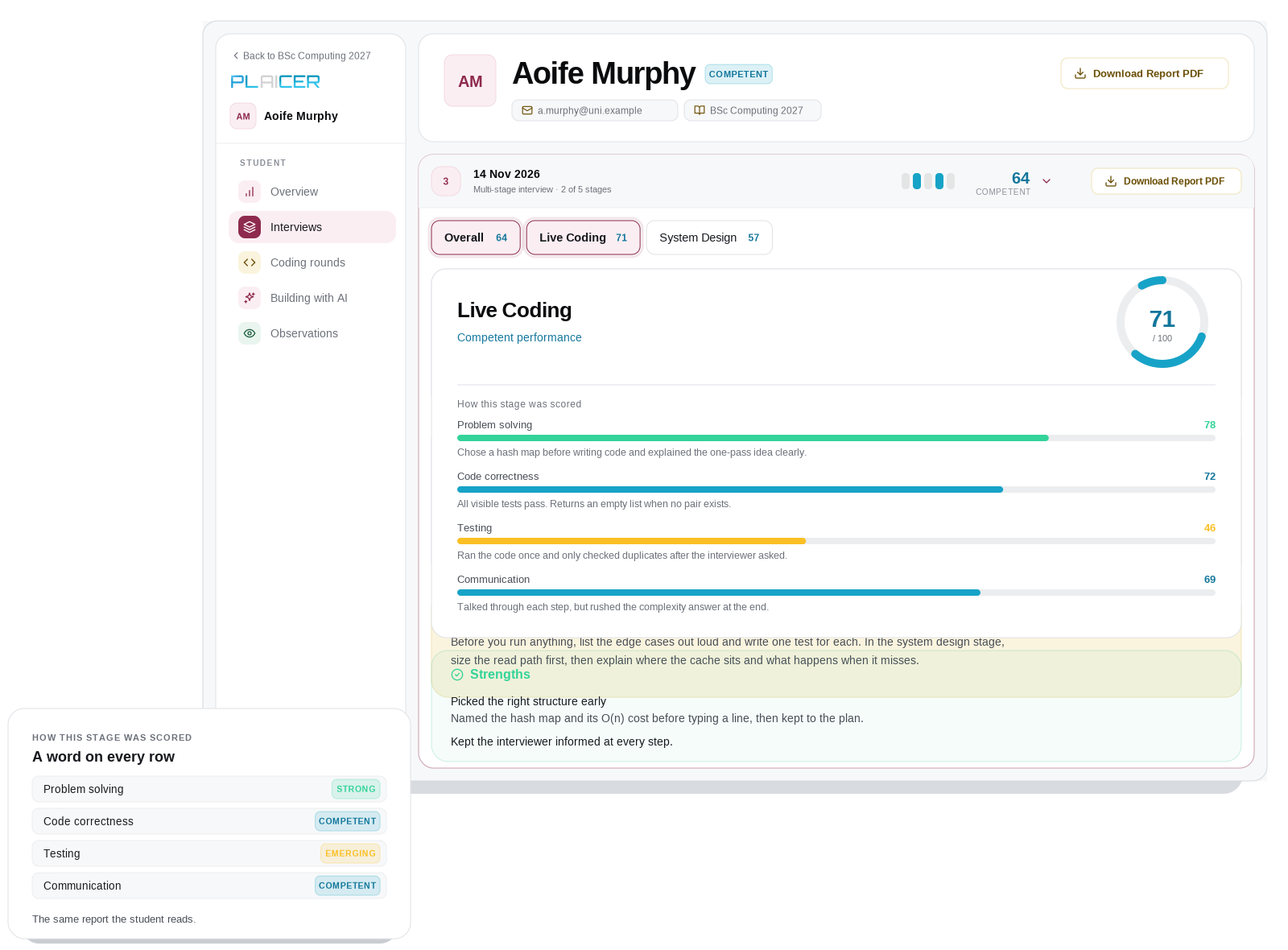
Educators see the same report the student sees for each stage, with the overall score, the score for each named dimension, the areas to work on and the strengths. Every score uses one of four words, Developing, Emerging, Competent or Strong.
Transcripts of the student's spoken answers are not part of the reports educators read. Plaicer does not record audio or video.
How cohort credits are used
Your organisation holds a shared credit pool and assigns credits to each cohort. A student in an active cohort starts stages on the cohort's credits.
An admin who runs low can request more credits for a cohort, and management and the superadmins receive the request in the app and by email.
What educators see and what they do not
What an educator sees
- The report for each stage a student completes, with the overall score, the score for each named dimension, the areas to work on and the strengths
- Each student's progress charts, and the same charts averaged across the cohort
- The cohort average against your target, and the number of students at the target
- During a live observation the student accepted, the transcript and activity of that stage, and the educator's own notes
What an educator does not see
- Transcripts in a student's reports. A transcript is shown only during a live observation
- Audio or video, because Plaicer does not record either
- Students in cohorts the educator has not been given access to
- Students at other institutions
The conditions each stage runs under
Every student meets these rules in each stage, whether or not they practise in a cohort. They are the conditions behind each report an educator reads.
Full screen
Interview stages run in full screen. Leaving it is recorded as a warning.
Tab switches
Switching tabs during a stage is recorded. During a live observation, the educator sees when the student leaves the window.
Copy and paste
Copy, cut and paste are blocked in Interview Q&A, Live Coding, Project Deep Dive, System Design and Code Review.
Pasting in AI Feature Build
Pasting is allowed in AI Feature Build, because directing the assistant is part of the round. Each paste is recorded.
Microphone
Spoken stages check for a working microphone before they start. Spoken answers are turned into text, and no audio is stored.
Timers
Timers do not pause. When time runs out in a screening round, whatever the student has written is collected and scored.
Back and forward
The browser's back and forward buttons do nothing during a stage, so a stage cannot be left by pressing them.
How your students' data is handled
Before an institution puts a platform in front of its students, its data protection team needs to know where the data goes, who can see it, what the AI does with it and what happens to it afterwards. This diagram follows a student's answer from their browser.
The student's browser
On the student's device
- Spoken answers are turned into text by the browser's speech service
- Plaicer receives the text and stores no audio or video
The Plaicer platform
European Union
- Stores interviews, code, scores and reports
- Encrypted at rest and in transit
- Production systems and file storage are not publicly accessible
- Access to production data is restricted, logged and protected by multi-factor authentication
Our AI provider
Listed on the Subprocessors page
- Receives answers and code to run and score the interview
- Receives no names, email addresses or institution
- Contractually barred from training on them
Code sandboxes
European Union
- Student code runs in isolated sandboxes
- No third party receives it
The educator dashboard
Your institution
- Reports and scores for the cohorts each educator can access
- Transcripts appear only during a live observation the student accepted
Each provider that processes student data is listed with its purpose, location and transfer safeguard on the Subprocessors page.
Hosted in the EU
All student data is stored inside the European Union, encrypted at rest and in transit.
Never used to train AI
Student answers and code are never used to train AI models. Our AI provider is contractually barred from training on them.
No video or audio recording
Interviews are never recorded. Spoken answers are turned into text by the student's browser, and no audio is stored.
Sign-in with email codes
Students sign in with a one-time code sent by email, so Plaicer stores no student passwords.
Practice feedback
Scores are feedback for the student's own preparation. They are not automated decisions under GDPR Article 22 and do not set grades, admission or placement.
Checked for accuracy
Every student is scored against the same fixed rubric, and code is scored by running tests. Scoring is checked with pseudonymised samples, only where institutions opt in.
How long each kind of data is kept
- Interviews, code, scores and reportsKept forLife of the accountDeleted when the student deletes their account, or within 30 days of the institution's instruction
- Audio and videoKept forNever storedSpoken answers become text in the browser
- Data at the AI providerKept forAs its terms allowDeleted by the provider and never used for training
- Scoring quality samples, opted-in institutions onlyKept forUp to 30 daysNames, emails and institution removed first, deleted automatically, never changes a score
- Security and operational logsKept forUp to 12 monthsDeleted automatically
- BackupsKept forShort rolling scheduleExpire on the rolling schedule
Payment records are kept for the period Maltese tax law requires, with personal identifiers removed when an account is deleted.
Student rights and our contracts with you
Your students' rights
- Deletion
- A student can delete their own account at any time, which removes their interviews, reports and progress.
- Access and copies
- Students can request a copy of their data. We respond within the one-month statutory deadline.
- Live observation
- An educator may watch a stage live, hear the student speak and add notes. The student is shown that this is happening.
Contracts and incidents
- Data processing agreement
- A GDPR Article 28 agreement with our security measures, sub-processors and retention schedule. It covers UK GDPR for UK institutions.
- Breach notification
- We notify the institution within 48 hours of becoming aware of a personal data breach.
- Regulators
- Plaicer Tech Ltd (C 115881) is established in Malta, and our supervisory authority is the Malta IDPC. For UK institutions and students, the UK Information Commissioner's Office is the regulator.
What Plaicer does not do
- No AI training on student answers, code or reports
- No recording of video or audio, and no facial recognition
- No sharing of scores outside your institution
- No selling of data
Documents for your data protection officer
We provide our data processing agreement, sub-processor list, retention schedule and security measures on request. The security overview covers this page in a format you can file.
Other ways people use Plaicer
Each page describes the products that matter most for one kind of reader and the interview each product prepares for.
Questions about Plaicer for universities
Answers to common questions. For anything else, email the Plaicer team.
Email a questionWhere is student data stored?
All student data is stored inside the European Union, encrypted at rest and in transit. Student code runs in isolated sandboxes in the EU and no third party receives it.
Are student answers used to train AI models?
No. Student answers and code are never used to train AI models, and our AI provider is contractually barred from training on them. Student names, email addresses and the institution are not sent with the answers.
Are interviews recorded?
No. Plaicer does not record video or audio and does not use facial recognition. Spoken answers are turned into text by the student's browser, and Plaicer stores the text.
What can an educator see?
An educator sees the reports and scores of students in the cohorts they can access, the same report each student sees, without transcripts. A transcript is shown only during a live observation the student accepted. An admin on your team sees only the cohorts assigned to them.
Can an educator watch a student's interview?
Yes. An educator can schedule a live observation of one stage. The student can accept or decline, and during the stage the student is shown that it is being observed. The educator's notes are private until the educator shares them with the student.
Are scores used to grade students?
Scores are feedback for the student's own preparation. They are not automated decisions under GDPR Article 22, they do not set grades, admission or placement, and Plaicer does not share them outside your institution.
How is student data deleted?
A student can delete their own account at any time, which removes their interviews, reports and progress. Data held for your institution is deleted within 30 days of the institution's instruction.
Do you sign a data processing agreement?
Yes. We provide a GDPR Article 28 data processing agreement that covers UK GDPR for UK institutions, with our security measures, sub-processors and retention schedule. Email privacy@plaicer.com to request it.
Set up Plaicer for a cohort
Pricing for universities is based on cohort size. The Universities tab on the pricing page lists what is included and how to contact us.