Python Backend Tasks
The later rounds of a technical interview often give you a written brief and code someone else wrote. Python Backend Tasks let you practise that.
You build and repair backend functions in Python to a written brief and run them against visible and hidden tests. When a test fails, you see a symptom message that describes what went wrong, and you trace the cause from it.
- 01pass
Position 1 confirmed as protected safe square
- 02pass
Token leaving yard on six enters at position 1
- 03fail
Two consecutive sixes incorrectly triggered forfeit
- 04fail
Yard token blocked without a six
- 05fail
Full turn orchestrated
The Board Beast sample task
Board Beast is the engine behind a Ludo game. Five functions are written from scratch and one is inherited with a bug that forfeits players on legal dice rolls. You read the brief, write the code and find the fix.
Build the Ludo logic engine
Five functions from scratch and one inherited with a bug. Players are being forfeited on legal dice rolls. Read the brief, write the code and find the fix.
- safe_square_protection_verified
- yard_exit_on_six
- capture_blocked_safe_square
- triple_six_forfeit_triggered
- full_turn_orchestrated
- Turning a written brief into code that checks its inputs
- Python type edge cases, such as a bool passing an int check
- Finding a bug in code someone else wrote
- Combining five functions in one pipeline function
- Input validation and boundary checks
01def validate_dice(rolls):02 # Validate a sequence of dice rolls for a Ludo turn.03 # Rules: only a 6 earns another roll.04 # Three consecutive sixes forfeits the turn.05 # Returns: "Valid", "Invalid", "Forfeit", or "Invalid input"06 if not isinstance(rolls, list):07 return "Invalid input"08 if len(rolls) == 0:09 return "Invalid input"10 for roll in rolls:11 if not isinstance(roll, int) or isinstance(roll, bool):12 return "Invalid input"13 if roll < 1 or roll > 6:14 return "Invalid input"15 six_count = 016 for i in range(len(rolls)):17 if rolls[i] == 6:18 six_count += 119 if six_count == 2:20 return "Forfeit"21 else:22 if i < len(rolls) - 1:23 return "Invalid"24 six_count = 025 return "Valid"
How a Python Backend Task works
Each task is an engine of backend functions grouped by area, for example charges, refunds and a ledger. You open the brief, then work through the functions one at a time.
- 01Read the brief for the engine and the function you are working on.
- 02Write the function, or find and fix the bug in the one you inherited.
- 03Run your code and read the symptom message for each failing test.
- 04In Challenger mode, passing a function opens the next one in the engine.
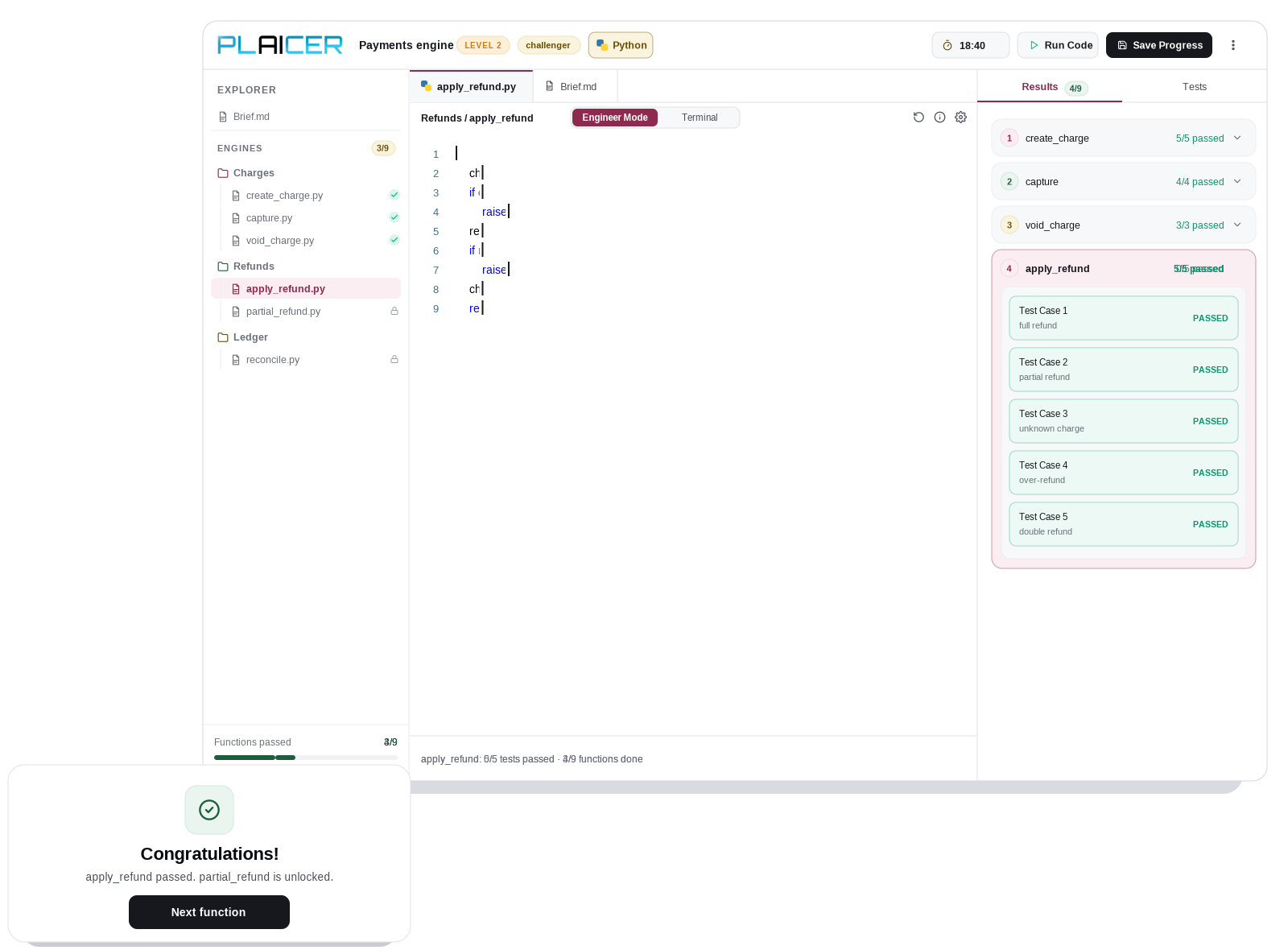
What you see and do in a Python Backend Task
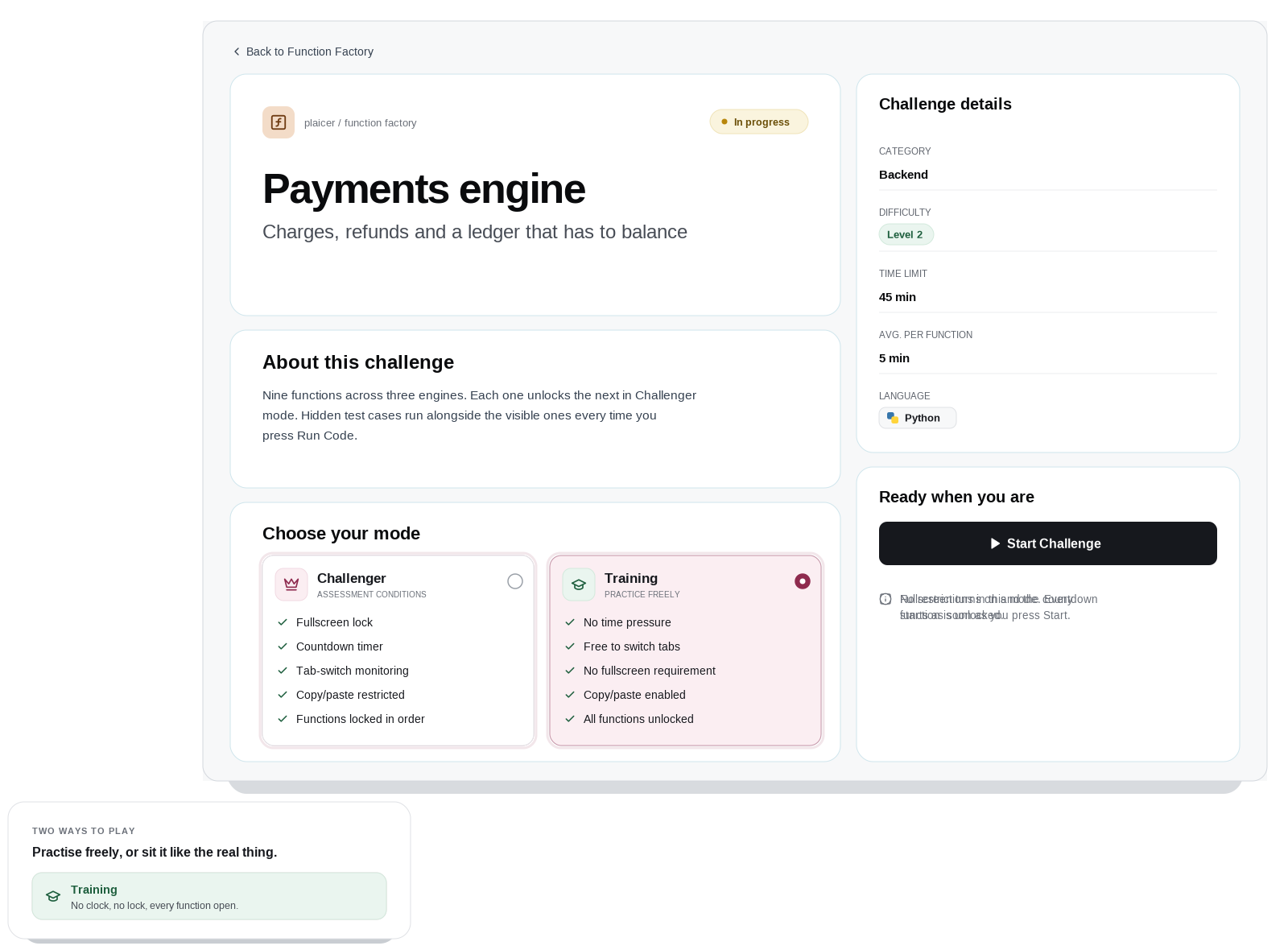
Each task opens on a page that describes it and lists its category, difficulty, time limit, average time per function and language. You choose a mode there and start.
Code runs on Python 3.10.
The brief and the approach
The Explorer on the left lists the engines and the functions inside each one, with a count of functions passed. Document tabs hold the background, the instructions and the engine description.
Each function has its own brief, which says what the function must return, and an approach tab, which describes how to tackle it.
Running your code
Run Code runs every test for the function, hidden tests included. The status line shows how many tests passed and how many functions in the task are done.
There is no limit on runs, and Save Progress saves your code at any point.
What a failing test shows
In the terminal view, each visible test shows its input, the expected output, your actual output and any error.
At Level 1 you can switch to Engineer Mode. It replaces the raw output with a one-line result or symptom for every test, hidden tests included, so you work from the symptom as you would from a production log.
Fixing an inherited function
Some functions start with starter code that contains a bug. The brief describes what the function should do, and you find where the code differs from it.
Pipeline functions
The last function in each engine is a pipeline function that calls every other function in the engine. You paste your completed functions into the editor and write the pipeline function below them.
A wrong result in any helper function changes the pipeline result, so the pipeline tests check the engine as a whole.
Timers and progress
Each function has its own timer. When it runs out you can keep working, because your score is based on the tests you pass, and the function is marked Timed Out on your results.
The first time a function passes every test, your progress saves and the next function opens.
Your results
The results page shows the share of functions that passed every test, the functions passed, the time taken and the number of code resets. In Challenger mode it also shows tab changes and full-screen exits.
Progress by engine lists every function with its tests passed, its time and its mode, and marks any function that timed out.
Training mode and Challenger mode
Before each task starts you choose a mode. Challenger mode simulates the conditions of a real online assessment. Training mode lets you practise the same task without restrictions.
In Challenger mode, full screen turns on when you start and each function has a countdown timer. Leaving full screen or switching tabs pauses the timer and is recorded on your results. Copying code out of the editor is blocked, and the functions in an engine open one at a time as you pass them.
In Training mode there is no time pressure. The timer counts up, you can switch tabs, full screen is not required, copy and paste work, and every function is open.
Three levels in every set
Each set of Python Backend Tasks has three levels, and each level adds conditions the code has to handle.
Level 1, correct functions from a brief
Clean inputs and a clear brief. Some functions you write from scratch and some you inherit with a bug. Each one has to return exactly what the brief describes.
Level 2, failures and bad input
Inputs arrive in the wrong shape and dependent systems fail. Each function has to handle these cases and return the result the brief describes, without failing silently.
Level 3, multi-step workflows
Functions are combined into multi-step workflows. A fault in one function changes the result of every step that depends on it, so you test the whole workflow as well as each function.
What each Python Backend Task includes
Build and repair functions
Some functions you write from scratch to a brief. Others you inherit with a bug, and you find and fix the fault.
Visible and hidden tests
The Tests tab shows the visible tests with their input and expected output, and says how many hidden tests also run when you click Run. Hidden tests count toward your passed total.
A pipeline function in every engine
Each engine ends with a pipeline function that calls your other functions. If one function is wrong, the pipeline result is wrong too.
Backend systems as the setting
Tasks are set in backend systems such as messaging apps, game engines, rental platforms and live commerce.